

How To Find HSN Code?

Got your HSN codes right? Receive export payments with instant FIRA on Skydo
TL;DR
- What is an HSN code? The HSN code is a standardized number that classifies physical goods for trade and tax. Services use SAC codes instead. India uses an 8-digit HSN code for customs.
- Where to find your HSN code Find your HSN code on the GST portal's HSN/SAC search (Services, User Services, Search HSN Code, no login needed), or in CBIC resources and the official tariff schedules for detailed cases. Tools like ClearTax, Tally and Drip Capital give faster free HSN code lookups.
- What you need to find the HSN code To find the right HSN code, have the product name, its material, its function and use, the transaction type, and your turnover. Imports and exports usually need the 8-digit HSN code.

What Is an HSN Code?
HSN stands for Harmonized System of Nomenclature. It's a standardized system that classifies goods by their nature, characteristics, composition, function and other relevant attributes, and it gives international trade a common framework, with further detail added at the national level. HSN applies to physical goods only. Services are classified separately, under Services Accounting Codes (SAC).
For example, HSN 0901 refers to coffee under the HSN classification. The first two digits, 09, identify the chapter for coffee, tea, mate and spices, while 01 identifies the heading for coffee.
💡 QUICK INSIGHT
The Harmonized System is developed and maintained by the World Customs Organization (WCO), and the international classification runs to six digits. Countries can add more digits for national detail, India uses eight digits for its customs tariff. The WCO revises the system every five to six years, most recently in 2022, adding classifications for advanced technology, environmental monitoring and health products.
How to Find HSN Code?
You can find HSN codes through the GST portal, CBIC customs resources, and the official customs tariff schedules. The GST portal is useful for a quick product search, while CBIC and the tariff schedules provide more detailed classification information for specialised products and imports or exports.
GST Portal's HSN/SAC Search Tool
- GST Portal's HSN/SAC Search Tool — Go to Services → User Services → Search HSN Code. You don't need to log in to use the search facility.
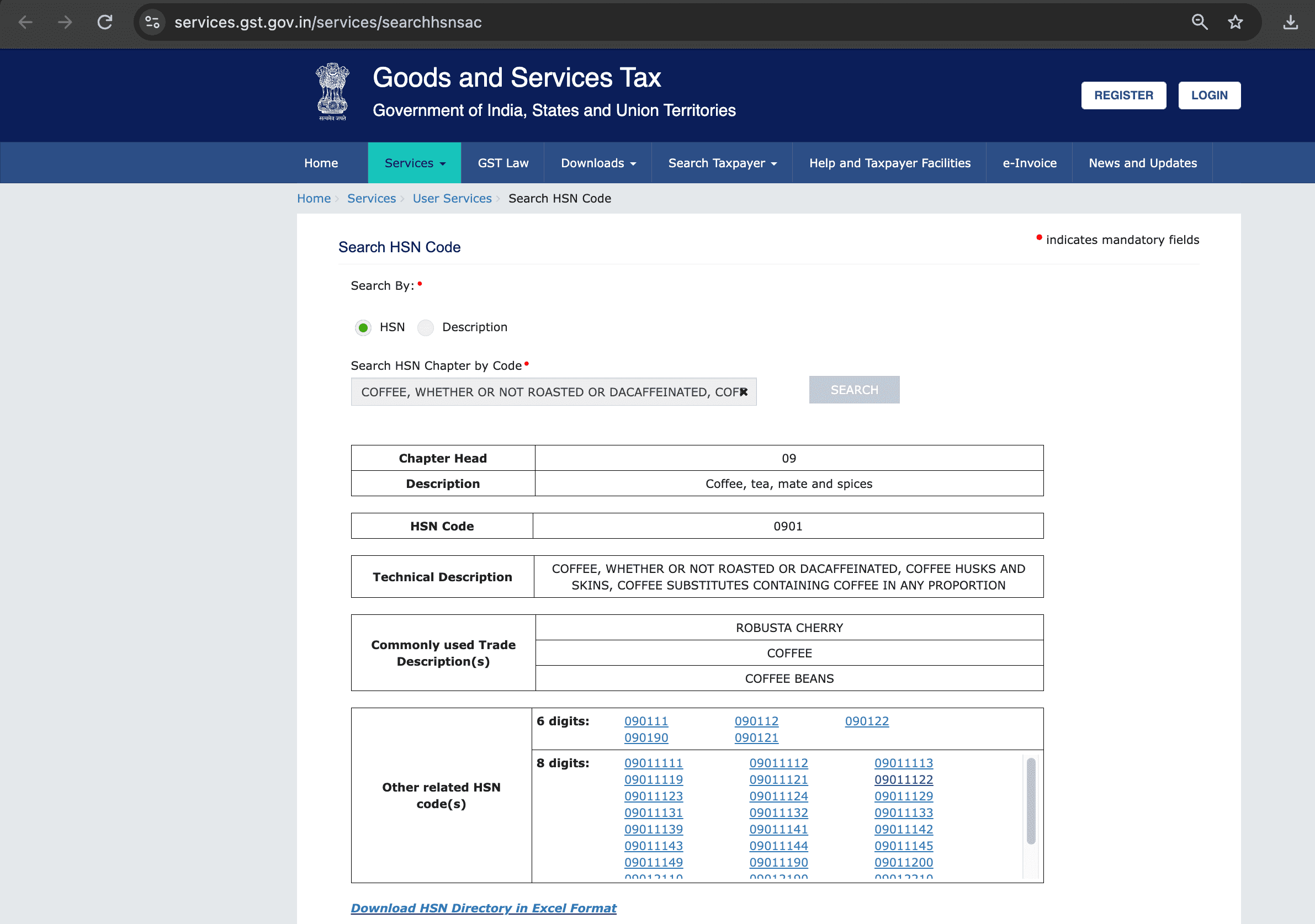
- Search using the product name or description to find the relevant HSN classification and associated GST rate information.
- The search facility uses AI and machine learning and is linked to the e-invoice declaration database, allowing it to learn from taxpayer classification patterns.
- Use a specific product description rather than a broad category, then compare the result with the actual goods you supply before selecting the code.
Third-Party HSN Code Finder Tools
If you want a faster, user-friendly search experience without browsing complex tariff schedules, several accounting platforms and trade fintech tools offer free, instant online HSN/SAC lookups:
- ClearTax HSN Code Finder — Enter any product keyword or broad industry term to quickly get matching 4, 6, and 8-digit HSN codes alongside their official GST rates.
- Tally Solutions GST Rate & HSN Finder — A direct lookup tool tailored for GST billing that lets you search by product description, auto-categorizes items, and shows mandatory digit requirements based on turnover.
- Drip Capital HSN Code Search — Useful for cross-border exporters and traders, this tool allows you to search via category hierarchies or keywords to cross-reference Indian 8-digit trade codes with applicable export/import descriptions.
Note: While third-party finders make search much faster, always double-check your final 8-digit selection against your official tax invoice specifications or e-invoice requirements.

HSN codes sorted? Now get paid globally
- Instant FIRA per payment
- Clean GST records
- Zero forex margin
What Information is Needed to Find HSN Codes?
Finding the right HSN code starts with understanding the product you are dealing with. You’ll typically need basic details such as what the product is, what it is made of, how it is used, and the type of transaction you are making. Once you have this information, you can identify the relevant HSN chapter, heading, and the level of code you need.
- Product name and description: Start with the common name of the product, along with a clear description of what it is. A technical or trade name can also help narrow down the classification.
- Material or composition: Note the primary material used to make the product. For example, whether it is made of cotton, plastic, iron, wood, or another material can affect its classification.
- Function and intended use: Explain what the product does and how it is primarily used. The product’s purpose or application can help distinguish it from similar products that may have a different HSN code.
- Relevant product category: If you already have an idea of the broad category your product belongs to, use it as a starting point. HSN codes are organized into chapters and progressively more specific headings and subheadings.
- Type of transaction: The level of detail required may depend on whether you are selling domestically, importing, or exporting. Imports and exports generally require the more detailed 8-digit ITC-HS classification.
- Business turnover: Your annual turnover can determine the level of HSN reporting required for domestic supplies. Depending on your turnover and the nature of the transaction, you may need to report a 4-digit, 6-digit, or more detailed code.
Having these details ready makes it easier to narrow down the classification and choose the HSN code that best matches your product and transaction.
How to Check Whether an HSN Code Is Correct?
Once you have a code, run it through four checks before it goes on an invoice.
- Match the official description against the actual product.
- Check the relevant chapter and heading notes.
- Look for a more specific subheading where one applies.
- Verify the applicable GST or customs classification.
Avoid relying only on an old invoice, a supplier-provided code, a marketplace listing or a generic search result. Any of those can be right, and none of them is a verification.
Examples of Commonly Used HSN Codes
Here are codes exporters ask about often. Treat this as a quick reference, not a classification list.
| Product | HSN code |
|---|---|
| Coffee, not roasted, not decaffeinated | 09011110 |
| Cotton t-shirts | 61091000 |
| Handmade jewellery | 71131900 |
| Laptops and portable computers | 84713010 |
| Other communication devices, such as routers and modems | 85176290 |
| Carpets and other textile floor coverings, knotted, of wool | 57011010 |
The exact six or eight-digit classification can vary with the product's material, composition, function, specifications and intended use, so a code that fits one exporter's product will not automatically fit yours. Verify the applicable code against the official tariff or GST classification before it goes on an invoice or an export document.
HSN codes sorted? Now get paid globally
- Instant FIRA per payment
- Clean GST records
- Zero forex margin
Free cross-border payments guide

Receive International Payments for Your Export Invoices With Skydo
Getting the classification right is one half of an export invoice. The other half is your overseas customer having a convenient way to actually pay it, and that is where a correctly coded invoice can still sit unpaid for days.
Skydo helps Indian freelancers, service exporters, exporters and businesses receive international payments. You get virtual overseas account details in USD, EUR, GBP, SGD, AUD and CAD, so your customer pays the way they already pay everyone else. Local payment methods such as ACH, Fedwire and SEPA are available where the relevant currency and corridor support them.
Payout to your Indian bank account is typically within one business day after the payment reaches the relevant virtual account, and you can track the payment digitally instead of chasing anyone for a SWIFT copy.
Pricing is flat and tied to the payment you receive.
- $19 for payments up to $2,000.
- $29 for payments from $2,001 to $10,000.
- 0.3% for payments above $10,000.
- 0% FX markup on every payment.
There are no intermediary bank charges and no separate FIRA fees, and there is no monthly subscription. You pay per payment received.
HSN codes sorted? Now get paid globally
- Instant FIRA per payment
- Clean GST records
- Zero forex margin

Get international bank accounts in 5 mins

Save as much as ₹10 lakh annually with Zero FX Margin

Real time payment tracking and instant FIRA
Get international bank accounts in 5 mins
Save as much as ₹10 lakh annually with Zero FX Margin
Real time payment tracking and instant FIRA
Frequently asked questions
HSN stands for Harmonized System of Nomenclature. It is used to classify goods for taxation, customs, invoicing and trade purposes, and it is maintained by the World Customs Organization.
About the author

Solution & banking
With a decade of experience at Citi Bank, Prashanth leads payments partnerships and solutions at Skydo.

Verified by
Abhilove ShardaLatest blog posts
View all posts
Best International Payment Methods in 2026: A Complete Comparison

International Wire Transfer Cut-Off Times Explained
6 Best Accounts Receivable Software for Indian Businesses in 2026
Related blog posts
View all postsBest International Payment Methods in 2026: A Complete Comparison
International Wire Transfer Cut-Off Times Explained